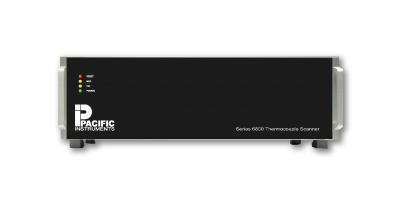
Model 6010U 4-Slot, USB Data & Control Interface Enclosures

In stock

Custom manufacturer 7 yrs CN

About Product

FeaturesEnclosure for 4 I/O modulesUSB 2.0 Interface provides 4.8 MS/s aggregate data rateCalibration voltage distributionAlarm busses for control of external equipmentOptional remote operation using gigabit EthernetOptional on-board data storageBuilt-in fans and cable trayDescriptionThe 6010U enclosure has 4 slots for Series 6000 input and output modules with a Universal Serial Bus (USB2.0) computer interface for programming, control and data output. For larger systems, up to 32 enclosures may be combined using USB 2.0 hubs or a computer with multiple USB 2.0 ports. The enclosures are 3U 19-inch, rack mount or desktop. The enclosures have integrated fans providing air circulation and an internal cable tray that routes the input and output cables from the front of the installed modules to exit the rear of the enclosure.A sample clock bus is provided for multi rack installations. Programming and data transfer is USB 2.0, which provides high data transfer rates with low, predictable latency. It interfaces to the USB 2.0 port provided on most PC computers including laptops. Maximum length of the interface cable is 3 meters but it may be extended further using Ethernet with the Control & Data Processor (CDP) option.Data Redundancy is optionally available. A 2.5″ HD (Module 6095) mounts on the USB controller board in each 6010U enclosure and provides a redundant recording point for the DAS. In the unlikely event the Operators Workstation or DAS Software fails, data will continue to record in each enclosure. Data can be recovered from the system post-test.The Control & Data Processor (CDP) interfaces multiple 6000U enclosures to gigabit Ethernet providing remote and/or distributed operation. The CDP is typically installed with the Series 6000 DAS and provides an Ethernet interface to the Operators Workstation. The CDP includes a high-speed processor and software that performs low-level operations freeing resources on the Operators Workstation computer for data display, storage, distribution and reduction.The Operators Workstation (PCCOWU-DHD) is the primary control and data recording point for the Series 6000 DAS. The PCCOWU-DHD is typically installed in the control room and runs PI660 Data Acquisition Software for system setup, calibration, display, recording, distribution and export. In installations where the DAS is not remote from the Operators Workstation, the PCCOWU-DHD will connect directly to Series 6000 Enclosures and does not require the CDP.

Category Items
Enclosure Specifications Series 6000 and 6100 Enclosures are common between the two product lines. Integrated A/D, data and sample rates noted in enclosure specifications apply only to the Series 6000 systems.
Downloads Model 6010U

Key attributes

Know your supplier


Website:http://www.pacificinstruments.com/index.html
Company Name:Pacific Instruments Inc.
Location:Concord, CA 94520
Description:Manufacturer of data acquisition, turnkey and computer-automated physical measurement systems. Products include accelerometers, amplifiers, digitizers, signal conditioners, recorders, modules, cables, adapters, frequency counters, connector panels, time code readers, test sequencers and power supplies. Capabilities include product calibration, repair, installation and verification and systems integration. Fan covers, calibration resistors, scanners, rack mounting trays and post-warranty technical support services are also available. Various applications include aerospace, vehicles, government-funded research agencies, military, wind tunnels, hydraulic systems, locomotive and rail cars, metal forming, non-destructive materials testing, packaging and shipping materials, power generation and transmission and stress analysis. One year warranty.

Product Reviews

Maden is absolutely amazing! Their team was a real pleasure to work with and check out our documents

Vlad Matsiiako
Co-founder, Infisical
Maden has been amazing for us! Even as a small team, we struggled to keep up with development and update documentation as changes were made. Now the docs are managed as code and are part of the development process and PR. As an open source project, moving documentation has
Maayan Salom
Co-founder, Elementary
This is a must have if you are building any kind of developer tools. We have used other options in the past that seem outdated in terms of look and feel compared to Maden. The team helped us
Zeno Rocha
CEO, Resend
My team loves Maden! Great product team.
Adam Carrigan
Co-founder, MindsDB
Maden was the only option that met all the requirements. To get the look, feel and features. or Mintlify be
Ashley Mulligan
Head of Product Engineering, Flatfile
Absolutely the best. It's damn easy to set up and the team was great to work with
Chun Jiang
CEO, Monterey AI
Why spend a week coding your own documentation (and optimizing it for SEO, design, etc.) when Maden gives you the best documentation in minutes?
Charly Poly
CEO, Defer
The way Maden displayed its documentation felt really user-friendly to us, and more importantly, to our developer customers.
Mark Bao
Co-founder, Goody

$0.00

Shipping

Shipping solutions for the selected quantity are currently unavailable

Delivery via maden

Expect your order to be delivered before scheduled dates or receive a 10% delay compensation

Secure payments

Every payment you make on Maden is secured with strict SSL encryption and PCI DSS data protection protocols

Refund policy

Claim a refund if your order doesn't ship, is missing, or arrives with product issues

Maden protects all your orders placed and paid on the platform with
Buy now, pay later. Learn more
Pay in 4 interest-free payments. Learn more

Explore from Premium Brands

Frequently Asked Questions

Maden is a multi-vendor marketplace platform where businesses can showcase and sell their products. We aim to connect vendors and customers, creating a thriving business ecosystem.
Many vendor profiles have already been created on Maden. Simply search for your business, claim your profile, verify your business, and start adding products to sell.
We’ve created preliminary profiles for various businesses to streamline the onboarding process. If you see your business listed, you can claim and verify it to start selling on Maden.
To claim your profile, locate your business on Maden, select the “Claim Profile” option, and follow the verification steps to prove ownership.
To ensure authenticity, you’ll need to provide official documentation or information that verifies your association with the business.
Maden may charge fees based on transaction volumes or subscription models. Check our pricing page for details on fees and any applicable charges.
Yes, once you claim your business profile, you can customize it to reflect your brand, add a logo, and upload your product listings.
We offer promotional tools, such as featured listings and sponsored placements, to help businesses reach a wider audience.
Our customer support team is available to help with any issues. You can reach out through the contact section on the Maden website.

Main Menu

Model 6010U 4-Slot, USB Data & Control Interface Enclosures